
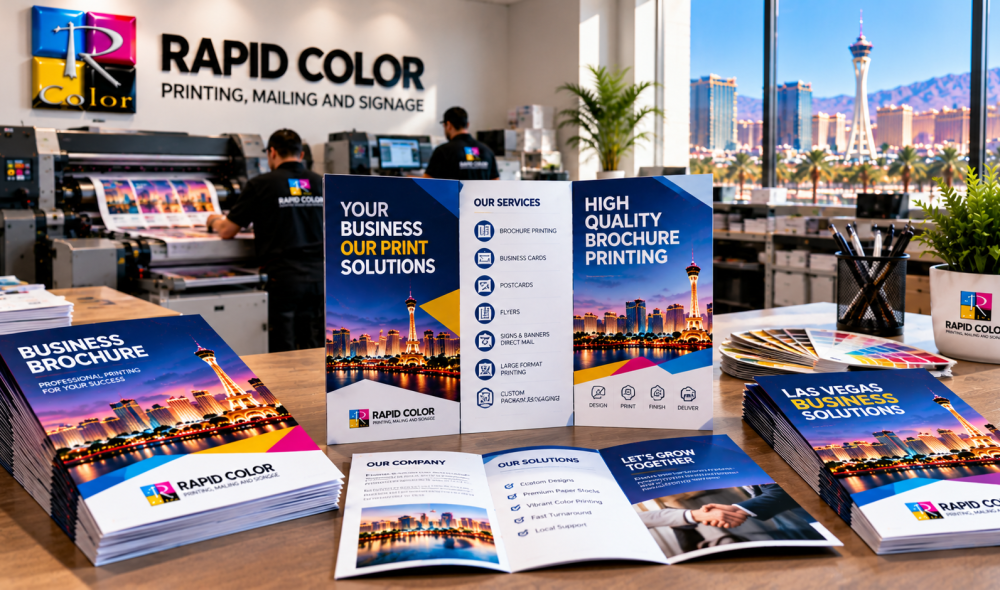
Brochures help businesses explain their products, services, and value in a format customers can keep and revisit. A strong result depends on more than attractive artwork: paper stock, layout, print method, color accuracy, finishing, and proofing all affect the final piece. If you are planning professional brochure printing, the right choices can help your brochure look polished, stay readable, and represent your brand consistently. This guide explains the main factors to review before approving a print run.
Understanding Brochure Printing
Brochure printing is the production of folded or multi-page marketing materials used to present information in a clear, portable format. Common options include bi-fold brochures, tri-fold brochures, Z-folds, gate folds, and multi-page booklets. The right format depends on how much information you need to share, how the brochure will be distributed, and what readers should do after viewing it.
Before choosing specifications, define the brochure’s purpose. A product overview may need large images and concise feature descriptions, while a service guide may need more room for details, contact information, and calls to action.
Choosing the Right Paper Stock
Paper affects a brochure’s appearance, durability, and feel. Consider the audience, design, budget, and where the piece will be used before selecting a stock.
Gloss, Matte, and Uncoated Paper
Gloss stock has a reflective surface that can make photographs and colorful graphics appear vivid. Matte stock has less shine and can be comfortable to read under bright lighting. Uncoated paper offers a natural texture and is often suitable when readers may need to write on the brochure. No finish is best for every project; choose the one that supports the message and design.
Paper Weight and Durability
A lighter text stock can work well for handouts and large distributions, while a heavier stock can make a compact brochure feel more substantial. Ask your printer about available weights and how the chosen stock folds, handles ink coverage, and works with any coating or finishing.
Designing a Clear and Effective Brochure Layout
A well-organized layout helps readers find important information quickly. Establish a clear hierarchy with a headline, short sections, readable body text, and visuals that support the message. Keep each panel focused on one main idea and make sure the order of panels follows the intended reading sequence.
Use Images, Typography, and White Space Carefully
Use high-quality images that remain sharp at the final print size. Choose readable typefaces and avoid making body text too small to fit extra information. White space gives content room to breathe and helps key details stand out. Maintain consistent colors, fonts, and logo placement so the brochure feels like part of the wider brand identity.
Prepare the Correct Fold and Dimensions
Confirm the finished size, open size, fold type, panel widths, and safe areas before completing the design. Folded panels may require slightly different widths to close neatly. Keep essential text away from trim and fold lines, and include bleed wherever artwork extends to the edge of the finished piece.
Choosing the Right Printing Method
Digital and offset printing can both produce professional brochures. The best option depends on quantity, turnaround, personalization, artwork, and budget.
Digital Printing for Shorter Runs
Digital printing is often practical for short and medium quantities, projects with tight schedules, and jobs that may need frequent updates. It can also support personalized versions when each brochure needs different text or images. Review a proof before production if color, text placement, or fine details are important.
Offset Printing for Larger Quantities
Offset printing is often worth considering for larger runs where consistent reproduction and unit cost matter. Setup requirements can make it less economical for very small orders, so compare the total estimate rather than price per piece alone.
For more information about production choices, visit Rapid Color’s digital printing services and discuss your quantity and deadline with the print team.
Maintaining Color Accuracy and Image Resolution
Color on a screen can differ from color on paper because screens emit light and printed materials reflect it. Paper type, ink or toner, coating, and the printing process all influence the final appearance.
Prepare Files for Print
Follow the printer’s file requirements for color mode, bleed, trim size, embedded fonts, and image resolution. Images should be high resolution at the size they will appear in the finished brochure; 300 DPI is a common target for standard commercial print images. Avoid relying on small images downloaded from websites because they may look soft or pixelated when enlarged.
Use Proofs for Brand-Critical Colors
Review the proof for color, contrast, image quality, text accuracy, and alignment. If exact brand-color reproduction is important, provide color references and ask the printer how those colors will be matched on the selected stock. Adobe’s color management guidance explains why consistent color settings matter across creative and production workflows.
Selecting Finishes and Special Effects
Finishing can protect a brochure or add a distinctive tactile effect. The right choice should complement the design rather than compete with the message.
Popular Brochure Finishes
Gloss or matte coatings can change the look and feel of the surface. Spot UV can add shine to selected areas such as a logo, while foil stamping creates metallic accents. Embossing raises a design element and debossing presses it into the stock. Availability depends on the material, format, and production method, so confirm feasibility before finalizing the artwork.
Balance Appearance, Use, and Budget
A premium finish may suit a high-value presentation, while a simple uncoated brochure may be better for a practical guide or handout. Consider how the brochure will be handled, mailed, displayed, or stored when choosing coatings and special effects.
Proofreading and Testing Before the Full Print Run
Proofreading is an essential production step. Check names, phone numbers, URLs, prices, dates, product details, spelling, and grammar. Review the fold sequence and make sure the contact information and call to action are easy to find.
What to Check on the Proof
Confirm dimensions, panel order, trim, bleed, image sharpness, color, and finishing instructions. Ask a colleague who has not worked on the design to review it with fresh eyes. Do not approve the full run until corrections have been made and the final proof reflects the version you intend to print.
How to Choose a Reliable brochure production Company
Choose a printer that can explain paper and finishing options, review your files, provide clear estimates, and communicate realistic production timelines. Ask what is included in the quote, whether proofing is available, and how delivery or mailing will be handled.
Businesses looking for local production can review Rapid Color’s brochure printing services in Las Vegas to compare formats, paper stocks, finishes, and available support. Share your quantity, finished size, fold type, artwork status, and deadline when requesting a quote.
Conclusion: Make Every Brochure Count
High-quality brochures come from coordinated decisions about paper, layout, print method, color, finishing, and proofing. Plan the message first, prepare print-ready artwork, and review a proof before authorizing production. Rapid Color helps businesses produce brochures for sales, events, customer education, and other marketing needs. Visit Rapid Color or call 702-792-6055 to discuss your project.
Frequently Asked Questions
What paper is best for brochure printing?
Gloss can suit photo-heavy designs, matte can reduce glare for text-heavy pieces, and uncoated paper offers a natural feel. Choose based on your design, audience, use, and budget.
Should I choose digital or offset brochure printing?
Digital printing is often practical for short runs and quick updates. Offset may offer better value for larger quantities. Compare total cost, schedule, and quality needs before deciding.
What image resolution should I use for a printed brochure?
A common target is 300 DPI at the final print size for standard commercial printing. Use original, high-quality images and follow your printer’s file specifications.
Why should I request a brochure proof?
A proof lets you check text, colors, image quality, folds, and layout before the full run. It helps catch errors while corrections are still possible.
Can I add special finishes to a brochure?
Depending on the design and stock, options may include gloss or matte coating, Spot UV, foil stamping, embossing, or debossing. Confirm availability and cost with your printer.
What information should I provide for a brochure quote?
Share quantity, finished dimensions, fold type, paper preference, color requirements, finishing, artwork status, and deadline. Mention if you also need design, delivery, or mailing.
Professional brochure printing starts with a clear brief, suitable stock, and artwork prepared to the printer’s specifications.
For many businesses, brochure printing is an effective way to present service details in a format customers can keep.
The right brochure printing choices can help balance visual impact, readability, and production cost.
Before approving brochure printing, check the finished size, fold sequence, color, and contact information.
Consistent brochure printing standards help keep marketing materials aligned with the wider brand identity.
Businesses planning brochure printing should compare the complete quote, including setup, finishing, and delivery.
Quality brochure printing depends on both good design and careful production checks.
A proof is an important step in brochure printing because it lets teams spot errors before the full run.
Professional brochure printing should begin with a clear goal and accurate final copy.