Why Brochure Design Tips Matter More Than Ever
In a marketing landscape crowded with digital content, a well-designed printed brochure cuts through the noise with a tangible, credible authority that digital media simply cannot replicate. Effective brochure design tips help businesses transform what could be a forgettable piece of paper into a persuasive sales tool that works long after the initial customer interaction. At Rapid Color, we’ve helped Las Vegas businesses produce thousands of high-performing brochures and the most successful ones share specific design principles that we’re sharing with you in this guide.
Whether you’re creating a tri-fold brochure design Las Vegas real estate agent use to showcase properties, a bi-fold services menu for a medical practice, or a multi-panel product catalog for a trade show, the brochure design tips in this guide will help you produce materials that inform, engage, and ultimately convert readers into customers.
The difference between a brochure that gets read and one that gets discarded often comes down to decisions made during the design process decisions about layout, typography, imagery, copy, and paper selection. Mastering these brochure design tips will elevate every piece you produce.
Understand Your Brochure’s Purpose Before Designing
The most fundamental of all brochure design tips is this: define the single primary purpose of your brochure before making any design decisions. Is this brochure meant to generate leads? Explain a complex service? Build brand credibility? Provide reference information customers will keep?
Each purpose demands a different approach to structure, content depth, and call-to-action placement. A lead-generation brochure should prioritize compelling benefits and a clear next step. A reference brochure should prioritize organized, easy-to-scan information. A brand brochure should prioritize visual impact and emotional storytelling.
Sales brochure design tips always start with purpose because design decisions flow logically from there. A brochure trying to accomplish too many things at once accomplishes none of them effectively.
Choose the Right Brochure Format
Tri-Fold Brochures
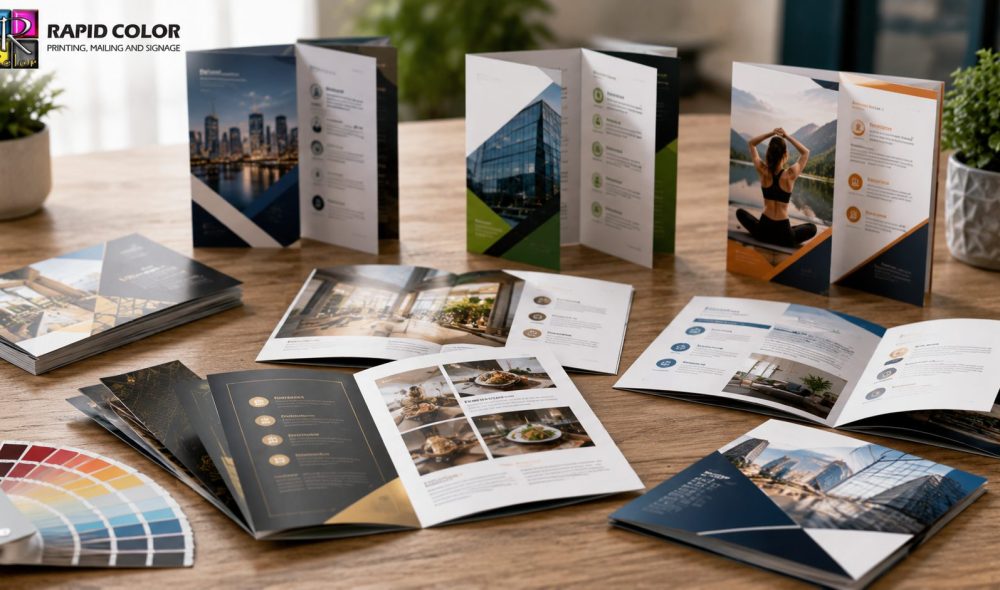
The tri-fold format is the most widely used brochure design in business marketing. It creates six panels three on each side that guide the reader through a logical information flow. The front panel serves as the cover and must create immediate visual interest. The back panel is the most read after the front, making it ideal for contact information and a call to action. The inside spread provides the most space for detailed content. Tri-fold brochure design Las Vegas businesses use is particularly effective for service businesses, restaurants, and real estate offices.
Bi-Fold Brochures
Bi-fold brochures create four panels with a wide, magazine-like feel when opened. This format provides more space for imagery and complex content than a tri-fold, making it ideal for product lines, portfolio presentations, and event programs. The larger panels also work beautifully for full-bleed photography, an important consideration in the brochure design tips for businesses with strong visual products or services.
Z-Fold and Accordion Fold
Z-fold and accordion fold brochures create a dynamic, interactive experience as the reader unfolds each panel. These formats work well for step-by-step processes, timelines, or content that benefits from a sequential reveal. They are particularly popular for trade show handouts and event promotional materials.
Master the Visual Hierarchy of Brochure Design
Visual hierarchy is one of the most important brochure design tips to internalize. It refers to the arrangement of design elements so that readers naturally process information in the sequence you intend. Effective visual hierarchy guides the eye from the most important element to the next most important, and so on, until reaching the call to action.
In practice, this means your headline should be the largest and boldest element. Supporting benefits should be in a medium weight and size. Body copy should be smaller and in a regular weight. Contact information and the call to action should be designed to stand out within the overall hierarchy through contrast, color, or placement.
Brochure layout best practices recommend leaving adequate white space around every element. Overcrowded layouts are harder to read and feel less premium, which undermines the credibility you want your brochure to convey.
Key Brochure Design Elements That Drive Conversion
These brochure design tips address the specific elements that most directly affect whether a reader takes action:
- Headlines That Address Customer Pain Points: Your cover headline should speak directly to the problem your reader wants to solve or the outcome they desire. “Finally, a Printing Partner Who Meets Your Deadlines” outperforms “Las Vegas Commercial Printing Services” every time because it leads with the customer’s concern, not the company’s description.
- Benefit-Focused Body Copy: Body copy should consistently answer the customer’s implicit question: “What’s in it for me?” Transform features into benefits – “200 DPI print resolution” becomes “Photography-quality images that make your brand look premium.” Effective brochure copywriting always puts the customer’s perspective first.
- Professional Photography and Imagery: Low-quality or generic stock photography undermines even the best-written brochure. Invest in professional product or service photography. Full color brochure design depends heavily on image quality your photos set the perceived quality standard for your entire brand in the reader’s mind.
- Social Proof Elements: Testimonials, case study summaries, client logos, awards, and years-in-business statistics build credibility quickly. Including at least one strong testimonial in your brochure is a brochure design tip that consistently improves conversion rates.
- A Clear, Compelling Call to Action: Every brochure should end with an unambiguous instruction telling the reader what to do next call this number, visit this website, scan this QR code, bring this brochure for a discount. The call to action should be visually distinct, easy to find, and tied to a specific, valuable next step.
Need expertly printed brochures that represent your brand at its best? Rapid Color produces full color brochure designs with fast turnaround and premium paper options. Call 702-792-6055 or visit rapidcolor.com to get started.
Brochure Paper Selection: A Critical Brochure Design Tip
Among all brochure design tips, paper selection is frequently overlooked yet profoundly impacts how readers perceive your brand. The feel of a brochure in someone’s hands communicates quality before they read a single word.
Paper Weight
Standard brochure paper weights range from 60 lb text (lightweight, economical, slightly translucent) to 100 lb text (heavier, more substantial feel) to 80 lb cover (card-weight, very premium feel). For most marketing brochures, 80 to 100 lb text is the appropriate range. For tri-fold brochure design Las Vegas high-end clients prefer, 100 lb text or 80 lb cover with folding creates an impressive, premium-feeling piece.
Coated vs. Uncoated Stock
Coated papers (gloss, satin, or matte coated) produce sharper, more vivid image reproduction and a more polished appearance. Gloss coating maximizes color vibrancy and is ideal for photography-heavy brochures. Matte coating provides a sophisticated, non-reflective finish that reads as premium and is easier to write on. Uncoated stock has a natural, tactile feel that suits certain brand personalities, particularly for eco-focused businesses or professional services where a warmer, more personal tone is appropriate.
Specialty Papers and Finishes
For maximum impact, specialty paper options and print finishes can elevate a standard brochure into a keepsake marketing piece. Soft-touch lamination gives a velvety feel that customers remember. Spot UV coating highlights specific design elements with a glossy sheen against a matte background. Foil stamping on the cover creates a metallic accent that communicates luxury. These finishing options are particularly popular for luxury real estate, hospitality, and high-end service businesses. Rapid Color’s digital printing and offset capabilities allow us to produce brochures with virtually any combination of stock, coating, and specialty finish.
Typography and Color in Brochure Design
Typography and color choices are the visual foundation of your brochure. These brochure design tips will help you make choices that enhance readability and brand consistency.
Limit your brochure to two or three typefaces one for headlines, one for body copy, and optionally one for accent text such as pull quotes or captions. More typefaces create visual chaos. Ensure body copy is set at a minimum of 9 points (10-11 points is preferable) with adequate line spacing for comfortable reading.
Color choices should align with your brand palette. If your brand uses specific Pantone colors, ensure your brochure printer can match them through four-color process printing or spot color options. Consistent brand colors across all materials brochures, business cards, signage build recognition and trust.
If you’re building a comprehensive marketing package, Rapid Color can ensure color consistency across your brochure printing, flyer printing, and all other print materials, ensuring a unified brand presence across every customer touchpoint.
Preparing Your Brochure File for Print
Even the best brochure design tips cannot save a file that is not correctly prepared for printing. Key technical requirements for marketing brochure printing Las Vegas production include:
- Resolution: All images must be at least 300 DPI at the final print size. Images pulled from websites are typically 72 DPI and will appear blurry when printed – always use original, high-resolution photography.
- Bleed and Safe Zone: Set up your document with at least 1/8-inch (0.125 inches) bleed on all sides. Keep all important text and design elements at least 1/8 inch inside the trim edge to ensure nothing is cut off during finishing.
- Color Mode: Design in CMYK color mode, not RGB. Colors that look vivid on screen in RGB can shift significantly when converted to CMYK during printing. Ask your printer for a digital proof before final production.
- Fonts: Either embed all fonts in your PDF or outline them before submitting to avoid font substitution issues. Rapid Color’s prepress team checks all files and will notify you if any font issues are detected.
- File Format: Submit your brochure as a press-ready PDF/X-1a or PDF/X-4 file for best results. Rapid Color accepts InDesign, Illustrator, and Photoshop source files as well.
Conclusion
The brochure design tips in this guide represent the accumulated wisdom of decades of print marketing experience. Applying these principles from defining your brochure’s purpose before designing, to choosing the right format, mastering visual hierarchy, selecting appropriate paper stock, and preparing files correctly for print will dramatically improve the effectiveness of every brochure you produce.
A great brochure is more than a piece of paper with your company’s information. It is a carefully engineered persuasion tool that guides readers from initial interest to confident action. In a world saturated with digital noise, a premium printed brochure that a customer can hold, keep, and reference is one of your most powerful marketing assets.
Rapid Color has produced marketing brochure printing Las Vegas businesses rely on for over 35 years. Our team can help you design, print, and deliver brochures that represent your brand with the quality it deserves. Contact us at 702-792-6055 or explore our full range of print services to start building marketing materials that convert.
Ready to create brochures that actually work? Get a free quote from Rapid Color today – call 702-792-6055 or visit rapidcolor.com. Professional brochure design tips put into action, every time.
Frequently Asked Questions About Brochure Design Tips
1. What is the best size for a marketing brochure?
The best brochure size depends on the distribution method and content volume. The most popular standard size is the 8.5×11 inch sheet folded into a tri-fold (letter-fold), creating six panels of approximately 3.67×8.5 inches each. This format fits standard brochure display racks, envelopes, and pockets. Larger formats like 8.5×14 (legal fold) or 11×17 (tabloid fold) provide more space for imagery and complex content. For trade show marketing brochure printing Las Vegas companies frequently choose 5.5×8.5 inch half-fold formats for easy portability. Choose the size that accommodates your content without crowding, while fitting your distribution method.
2. How many pages should a brochure be?
Most effective marketing brochures contain between four and eight panels (equivalent to two to four physical pages when folded). The ideal length is determined by your content needs and audience patience. Business brochures should include enough information to answer the prospect’s core questions and motivate action, but not so much that the reader feels overwhelmed and sets it aside. As a general rule, if you cannot express your core value proposition, key benefits, and a clear call to action in six panels, your messaging strategy may need refinement before addressing brochure design tips.
3. Should my brochure have a lot of text or mostly images?
Effective brochure layout best practices recommend a balance tilted toward imagery and concise, benefit-focused text rather than lengthy copy blocks. The human brain processes images 60,000 times faster than text, making strong photography and graphics the most efficient communication tool in your brochure. Use imagery to establish emotional connection and communicate quality, then use concise text to provide the specific details, benefits, and call to action. If your brochure content requires substantial explanatory text, consider a bi-fold or multi-page format that provides adequate space without crowding.
4. What is the difference between digital and offset printing for brochures?
For marketing brochure printing Las Vegas projects, the choice between digital and offset printing depends primarily on quantity and quality requirements. Digital printing is cost-effective for quantities under 500 to 1,000 pieces and offers fast turnaround, often 1 to 3 business days. Offset printing is more economical for large quantities (1,000+ pieces), offers superior color accuracy, Pantone spot color matching, and the widest range of paper stock and finishing options. For most small business brochure runs of under 500 pieces, digital printing delivers excellent quality. For quantities above 1,000 or for premium finishing options like foil stamping, offset printing is the preferred choice.
5. How do I make my brochure stand out from competitors?
The most effective brochure design tips for differentiation focus on three areas: quality of materials, clarity of value proposition, and emotional resonance of imagery. Premium paper stock and finishes like soft-touch lamination or spot UV immediately signal quality before the reader absorbs your content. A headline that articulates a specific, relevant benefit your competitors cannot or do not claim creates instant differentiation. And imagery that shows real customers, real results, or real-world use of your product or service builds credibility that generic stock photos cannot provide. A brochure that feels premium, communicates clearly, and uses authentic visuals consistently outperforms competitors’ materials.
6. How important is the cover of a brochure?
Among all brochure design tips, investing in your cover may be the highest-leverage action you can take. The cover determines whether the brochure gets opened or discarded. Research on marketing collateral consistently shows that readers make a keep-or-discard decision within 3 seconds of receiving a brochure, based primarily on the cover impression. A compelling cover image, a benefit-focused headline that speaks to the reader’s priorities, and premium production quality create a combination that earns the next 30 seconds of the reader’s attention. Treat your brochure cover like a direct response headline it must create curiosity, communicate value, or promise a solution to a problem.
7. What is the typical turnaround time for brochure printing in Las Vegas?
Standard marketing brochure printing Las Vegas turnaround times at Rapid Color are typically 3 to 5 business days for digital printing and 5 to 7 business days for offset printing after receipt of print-ready files. Rush services are available for time-sensitive projects. Common situations requiring rush turnaround include trade show preparation, grand opening events, and promotional campaign launches. We recommend submitting files as early as possible and always building in a 2 to 3 day buffer for proofing, any revisions, and shipping or pickup time. Contact our team at 702-792-6055 to discuss your timeline and we will do everything possible to accommodate your schedule.