
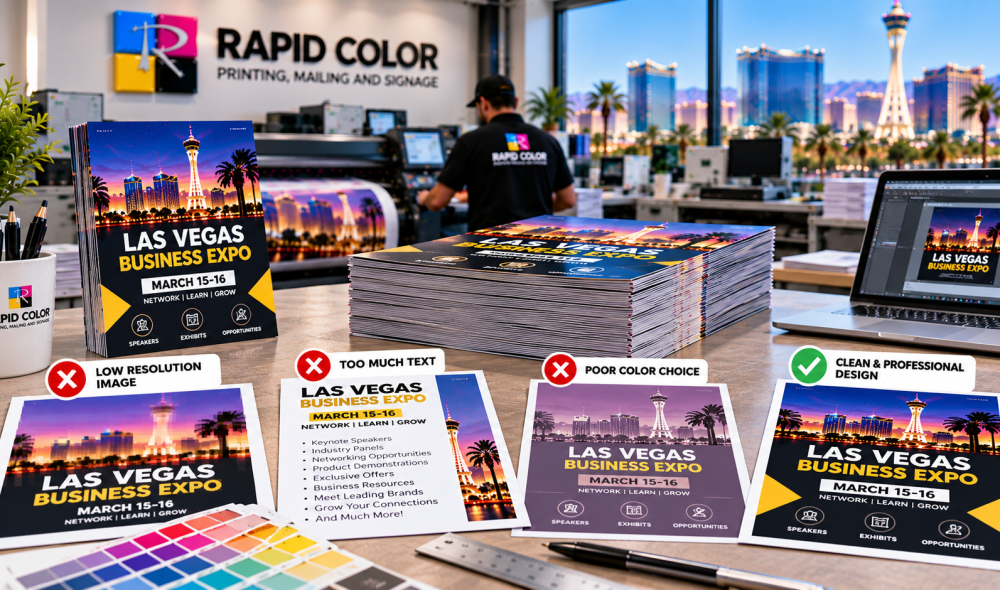
Flyer Printing is an effective way to promote sales, announce events, introduce services, and reach local customers. However, small mistakes in design, paper selection, and printing preparation can waste money and reduce campaign results. Businesses planning a promotional campaign should review professional flyer printing services to understand the available options before placing an order.
A successful flyer needs more than attractive colors. It must communicate the right message, reach the intended audience, and give readers a clear reason to respond. By avoiding common production and marketing mistakes, businesses can improve the quality of their printed materials while keeping projects within budget.
1. Common Flyer Printing Mistakes That Cost Businesses Money
Choosing an Unclear Message
One of the most frequent mistakes is trying to communicate too many things on a single flyer. When a design includes several offers, lengthy paragraphs, and multiple calls to action, readers may struggle to understand the main message.
Start by identifying one primary goal. It could be promoting a discount, encouraging event attendance, introducing a new service, or generating inquiries. Place the most important information where readers can find it quickly.
For effective Flyer Printing, use a clear headline, concise supporting text, and one primary call to action. Include essential details such as the offer, event date, business location, or contact information.
Using Low-Resolution Images
Images copied from websites or downloaded in small sizes may appear acceptable on a computer screen but look blurry when printed. This can make a business appear less professional.
Whenever possible, use original, high-quality photographs and properly prepared graphics. For many standard print projects, images at approximately 300 pixels per inch at their final printed size are a useful target.
Ask your printer about accepted file formats and image requirements before submitting artwork. Reviewing the final proof helps identify quality problems before production begins.
Ignoring Spelling and Contact Details
A spelling mistake, incorrect phone number, or broken website address can undermine an otherwise attractive design. These errors may require reprinting, adding unexpected costs to the project.
Before approving a design, check every headline, price, address, phone number, website, and promotional date. Have another person review the content because a fresh reader may notice errors that the designer overlooks.
2. How to Choose the Right Design, Paper, and Layout
Overcrowding the Layout
A flyer needs enough empty space to make the important information easy to read. Filling every area with text, images, icons, and decorative elements can make the design difficult to scan.
Use a clear visual hierarchy. The headline should attract attention, the supporting content should explain the offer, and the call to action should tell readers what to do next.
For business flyer printing, keep fonts readable and limit the number of typefaces. Make sure text contrasts sufficiently with the background, particularly when the flyer contains small details or contact information.
Selecting the Wrong Paper Stock
Paper selection affects the feel, durability, and cost of printed flyers. Lightweight paper may be suitable for mass distribution, while heavier stock can provide a more substantial feel for sales presentations or promotional handouts.
The right choice depends on how the flyers will be used, where they will be distributed, and how long they need to remain presentable.
|
Paper option |
Main benefit |
Suitable use |
|
Lightweight paper |
Lower material cost |
Large-volume distribution |
|
Standard text stock |
Practical and versatile |
Everyday promotions |
|
Heavyweight paper |
More substantial feel |
Events and business handouts |
|
Gloss-coated stock |
Smooth surface and vibrant graphics |
Photo-heavy promotions |
|
Matte-coated stock |
Reduced surface reflection |
Clean, professional designs |
Compare samples before making a final decision. A premium paper is not always necessary for a short-term campaign, while a more durable option may be worthwhile when the flyer represents a high-value service.
Forgetting Bleed and Safe Margins
Artwork that extends to the edge of a printed flyer generally requires bleed. This extra area allows the design to be trimmed without leaving unwanted white edges.
Important text and logos should remain inside the recommended safe margins. If they sit too close to the cutting line, they may appear uneven or become partially trimmed.
Before sending files for Flyer Printing, confirm the required document size, bleed settings, and export specifications with your printer. A properly prepared PDF can help reduce avoidable production delays.
3. Avoiding Budget and Distribution Problems
Ordering Too Many or Too Few Flyers
Ordering a large quantity may reduce the cost per flyer, but it can also create waste if the promotion changes or the materials become outdated. Ordering too few can lead to another production run, additional setup costs, and delays.
Estimate your distribution needs before requesting a quote. Consider the number of locations, expected audience, campaign duration, and whether spare copies are necessary.
For recurring promotions, printing a manageable quantity can provide flexibility. For established campaigns with confirmed distribution plans, bulk printing may offer better value.
Choosing Price Without Comparing Specifications
The lowest quote may not represent the lowest overall cost. Different printers may quote different paper weights, quantities, finishing options, and turnaround times.
When comparing flyer printing services, confirm that each quote includes the same specifications. Ask about setup charges, proofing, delivery, and any additional finishing costs.
A clear quote helps you compare the complete project rather than focusing only on the initial price.
Leaving Printing Until the Last Minute
Last-minute orders can limit paper choices, increase delivery pressure, and leave little time to correct artwork problems. Events, grand openings, and seasonal promotions are particularly sensitive to delays.
Prepare your content and design early. Allow time for proof approval, production, and delivery. If you need a faster turnaround, confirm availability with the printer rather than assuming the requested deadline can be met.
Distributing Flyers Without a Plan
Even a well-designed flyer may produce limited results if it reaches the wrong audience. Distribution should reflect the campaign goal and the people most likely to respond.
For a local service, relevant neighborhood businesses, community events, and permitted public distribution locations may be useful. For a trade show, handouts should reach attendees who are likely to be interested in the product or service.
Track responses using a dedicated landing page, campaign-specific QR code, promotional code, or phone extension. This helps you understand which distribution methods generate inquiries.
Following professional print-ready design guidelines can help you prepare artwork correctly and reduce common printing errors.
4. A Practical Checklist Before Approving Your Order
Use this checklist before sending the final artwork to production:
- Confirm the headline, offer, and call to action are clear.
- Proofread all text, contact details, and promotional dates.
- Check image quality, color contrast, and font readability.
- Verify the finished dimensions, bleed, and safe margins.
- Select paper stock and coating based on the intended use.
- Confirm quantity, price, turnaround time, and delivery arrangements.
- Review the final proof before authorizing the print run.
Following these steps can make Flyer Printing more predictable and reduce the risk of expensive corrections.
Frequently Asked Questions
1. What is the most common mistake when designing a flyer?
Overcrowding is a common problem. Too much text, too many images, and several competing messages make flyers harder to understand. Focus on one main offer, readable text, and a clear next step.
2. Which paper is best for promotional flyers?
The best paper depends on your budget and distribution method. Lightweight stock can suit large-volume campaigns, while heavier or coated paper may be appropriate for premium handouts and photo-focused designs.
3. What resolution should images have for printing?
Approximately 300 pixels per inch at the final printed size is a common target for photographic images. Check your printer’s requirements, particularly for large graphics and images that may be viewed from a distance.
4. How can businesses reduce printing costs?
Choose an appropriate paper stock, finalize the design before production, compare quotes using matching specifications, and order a quantity based on realistic distribution needs. Avoid expensive finishes unless they support the campaign goal.
5. How early should I order flyers for an event?
Order early enough to allow for artwork preparation, proof approval, production, and delivery. Timelines vary by quantity and finishing requirements, so confirm the schedule with your printer before committing to an event date.
6. How can I measure the success of a flyer campaign?
Use a dedicated QR code, landing page, promotional code, or campaign phone number. Track responses and compare them with distribution costs to understand whether the campaign is generating useful inquiries or sales.
Conclusion
Avoiding simple mistakes can improve the quality and value of your printed marketing materials. Clear messaging, suitable paper, properly prepared artwork, accurate contact details, and planned distribution all contribute to a more effective campaign.
Before ordering, review your design carefully and confirm the production specifications with your printer. A little preparation can prevent unnecessary expenses and help your message reach the right audience.
For businesses looking for reliable printing support, Rapid Color’s flyer printing services offer a starting point for discussing project requirements, paper choices, and production needs. Plan carefully, approve your proof, and make every printed piece count.